
Hot
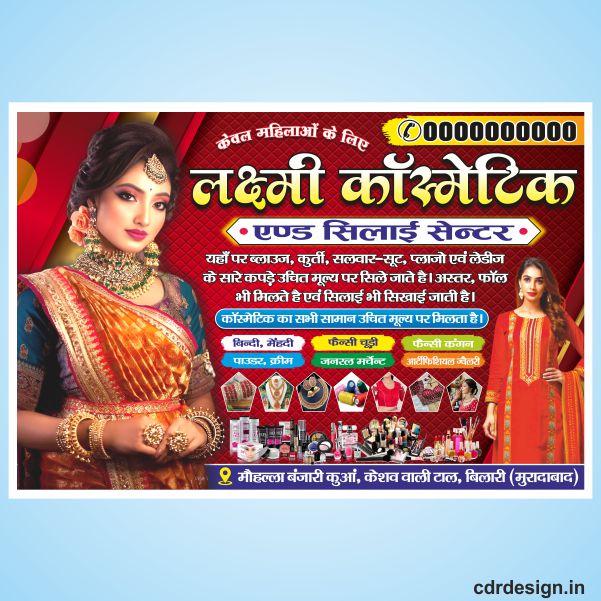

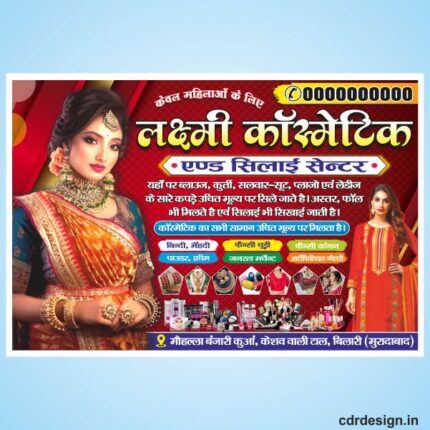
Cosmetic banner with silai center design cdr file
₹15.00
Cosmetic banner with silai center design cdr file
Corel Draw X3 File
With Necessary Fonts
The File is Editable in CorelDraw
ये डिजाईन प्रिंटिंग प्रेस वालों के लिए है अगर आपको एडिट करना आता है तभी खरीदें
-
खरीदने से पहले अच्छे से चेक कर लें कौन सी फाइल है, कौन सा वेर्जन है फॉण्ट दिया गया है की नही
- Note: this design is only for the designers not
- for customers. Customization start from Rs.200
- How to Download:
- https://www.youtube.com/
- Instant Download:
- Your files will be available
- to download once payment is confirmed.
- (instant download items don’t accept returns,
- exchanges, or refunds. Please check all details
- before buying.)
-
- Help Number: call or WhatsApp
- Call us: 6296285862 (9 AM to 6 PM)
- CdrDesign License: Use for personal and
- commercial purposes more info
- Copyright Disclaimer:
- This File is uploaded by
- the user. We do not claim any copyright for
- the content. ( If the contents violate your
- copyright, please email us,
- cdrdesign8@gmail.com
Description
The Ultimate Guide to Creating a Stunning Cosmetic Banner with a Silai‑Center Design (CDR File)
If you’re a beauty‑brand marketer, salon owner, or freelance designer, the visual impact of your promotional banner can make or break a campaign. In this post we’ll walk you through every step of creating a cosmetic banner that showcases a Silai‑Center design, using the CDR (CorelDRAW) file format – the industry‑standard for crisp, scalable graphics.
Thank you for reading this post, don't forget to subscribe!
Reviews (0)
Shipping & Delivery
More Products


Reviews
There are no reviews yet.