
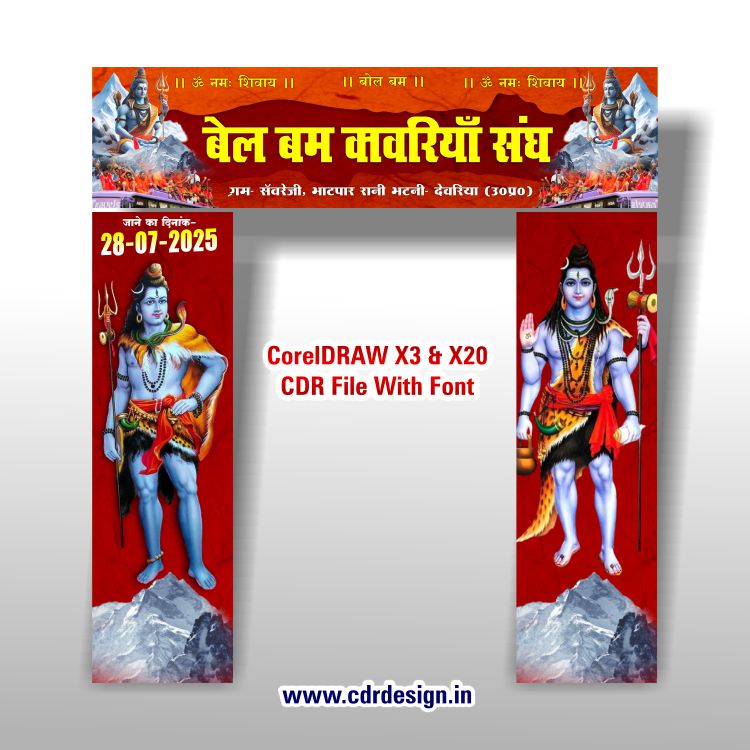
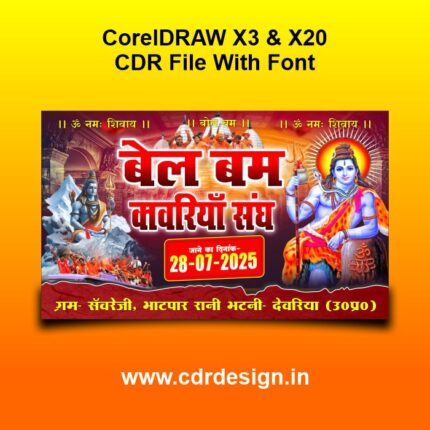

Bolbam Gate Banner CDR File
Original price was: ₹199.00.₹85.00Current price is: ₹85.00.
Bolbam Gate Banner CDR File
CorelDRAW 13 & 20 Version File
With Font
CDR Version 13 & 20 with Font Fully Editable
Color CMYK
siz 48MB
ये डिजाईन प्रिंटिंग प्रेस वालों के लिए है अगर आपको एडिट करना आता है तभी खरीदें
-
खरीदने से पहले अच्छे से चेक कर लें कौन सी फाइल है, कौन सा वेर्जन है फॉण्ट दिया गया है की नही
- Note: this design is only for the designers not
- for customers. Customization start from Rs.200
- How to Download:
- https://www.youtube.com/
- Instant Download:
- Your files will be available
- to download once payment is confirmed.
- (instant download items don’t accept returns,
- exchanges, or refunds. Please check all details
- before buying.)
-
- Help Number: call or WhatsApp
- Call us: 6296285862 (9 AM to 6 PM)
- CdrDesign License: Use for personal and
- commercial purposes more info
- Copyright Disclaimer:
- This File is uploaded by
- the user. We do not claim any copyright for
- the content. ( If the contents violate your
- copyright, please email us,
- cdrdesign8@gmail.com
Bolbam Gate Banner CDR File: Your Essential Design Companion
As the auspicious occasion of Bolbam approaches, the air fills with spiritual fervor, and preparations begin for the devotees embarking on the sacred journey. A prominent part of these preparations, especially for organizing committees, temples, and local communities, is the creation of visually appealing and informative banners. Among these, the Bolbam Gate Banner stands out as a crucial element, welcoming pilgrims, guiding them, and setting the spiritual tone.
Thank you for reading this post, don't forget to subscribe!For designers, printers, and organizers looking for efficiency and professional quality, the Bolbam Gate Banner CDR File has become an invaluable asset. But what exactly is it, and why is it so significant?
What is a Bolbam Gate Banner CDR File?
At its core, a CDR file is a proprietary vector graphics file format used by CorelDRAW, a popular graphic design software. When we talk about a “Bolbam Gate Banner CDR File,” we refer to a pre-designed, editable template specifically created for a banner to be displayed at the entrance or a significant point during the Bolbam pilgrimage.
Key characteristics of a CDR file in this context:
- Vector-Based: Unlike raster images (like JPEGs or PNGs) that lose quality when scaled, vector graphics are made of mathematical paths, allowing them to be scaled to any size (from a small flyer to a massive gate banner) without pixelation or loss of clarity.
- Editable Layers: A well-constructed CDR file will have organized layers for different elements – text, images, shapes, backgrounds. This allows for easy customization without affecting other parts of the design.
- Print-Ready: These files are typically designed with print specifications in mind, including appropriate color modes (CMYK), resolutions, and bleed areas, ensuring a high-quality output.
Why is a Bolbam Gate Banner CDR File So Valuable?
- Time-Saving: Designing a large banner from scratch can be a time-consuming process. A pre-designed CDR file provides a solid starting point, drastically cutting down design time.
- Professional Quality: These files are often created by experienced designers, ensuring a visually appealing layout, appropriate typography, and culturally relevant imagery.
- Full Customization: While a template, the CDR file allows users to fully customize every element. You can change text (route details, dates, organizing committee names), alter colors, replace images, and adjust the layout to fit specific needs.
- Scalability: As mentioned, the vector nature means you can use the same design for a small poster or a grand gate banner without quality degradation.
- Consistency: For organizations managing multiple banners, a CDR template ensures branding and messaging consistency across all printed materials.
What to Expect in a Typical Bolbam Gate Banner CDR File
A well-designed Bolbam Gate Banner CDR file will typically include:
- Prominent Religious Imagery: This often includes depictions of Lord Shiva (e.g., Lingam, Trishul, Damaru, Crescent Moon, Ganga’s flow), Shiva devotees (Kanwariyas) carrying holy water, and symbols like “Om.”
- Traditional Color Palette: Dominant colors are usually spiritual and vibrant, such as saffron (representing sacrifice and purity), reds, blues (often associated with Shiva’s throat), and whites.
- Key Text Elements:
- “Bolbam” (prominently displayed)
- “Har Har Mahadev,” “Om Namah Shivaya,” or other devotional chants.
- Welcome messages for pilgrims.
- Dates of the pilgrimage or specific events.
- Names of the organizing committee, temple, or sponsoring entities.
- Important instructions or contact information (e.g., “Water Point,” “First Aid”).
- Layout for Visibility: Designed keeping in mind that the banner will be viewed from a distance, with clear, readable fonts and a balanced composition.
- Placeholder Sections: Areas designated for adding specific local information, sponsor logos, or unique messages.
Who Benefits from a Bolbam Gate Banner CDR File?
- Graphic Designers: Whether freelance or working for a printing press, these files are a go-to for quick project turnarounds.
- Printing Businesses: They can offer rapid design services to their clients by leveraging these templates.
- Temple Committees & Event Organizers: For those with basic CorelDRAW knowledge, it empowers them to create their own professional-looking banners without hiring a full-time designer.
- Community Groups: Local groups organizing facilities for pilgrims can easily create banners to guide and welcome them.
How to Use and Customize Your Bolbam Gate Banner CDR File
- Software Requirement: You’ll need CorelDRAW (any recent version is usually compatible with most templates) installed on your computer.
- Open the File: Simply open the .cdr file in CorelDRAW.
- Explore Layers: Familiarize yourself with the file’s layers. This helps in isolating elements for editing.
- Customize Text: Use the Text Tool to edit names, dates, messages, and any other relevant information. Ensure you have the necessary fonts installed on your system, or choose suitable alternatives within CorelDRAW.
- Adjust Graphics: You can easily move, resize, or replace existing graphic elements. If you have specific images (like a local temple’s photo), you can import and integrate them.
- Color Adjustments: Modify colors if required, though it’s often advisable to stick to traditional Bolbam colors for cultural relevance.
- Review and Export: Once customized, carefully review the design for any errors. Then, export the file in a print-ready format (e.g., PDF, high-resolution JPG, TIFF) and share it with your chosen printer.
Where to Find Bolbam Gate Banner CDR Files
These files are commonly available through:
- Online Graphic Design Marketplaces: Websites like Envato Elements, GraphicRiver, or even specialized Indian design portals might offer such templates (though finding very specific religious festival templates might require deeper searching).
- Dedicated Template Websites: Many regional or community-specific design resource websites provide free or paid templates for such events.
- Graphic Design Forums & Communities: Designers often share resources within their networks.
- Direct from Printing Presses: Some printing businesses may offer to customize a pre-existing template as part of their service.
Important Considerations When Acquiring a File:
- Licensing: Always check the licensing terms. Is it for personal use, commercial use, or limited use?
- Compatibility: Ensure the file version is compatible with your CorelDRAW software.
- Quality: Look for files with good organization (named layers, grouped objects) and high-quality embedded graphics.
- Fonts: Verify if the fonts used in the template are free, included, or if you’ll need to source them separately.
In conclusion, the Bolbam Gate Banner CDR File is more than just a digital asset; it’s a powerful tool that streamlines the design process, ensures professional output, and helps communities and devotees beautifully express their faith during the sacred Bolbam pilgrimage. By leveraging these files, you can focus more on the spiritual significance of the event and less on the intricacies of design.





Reviews
There are no reviews yet.