
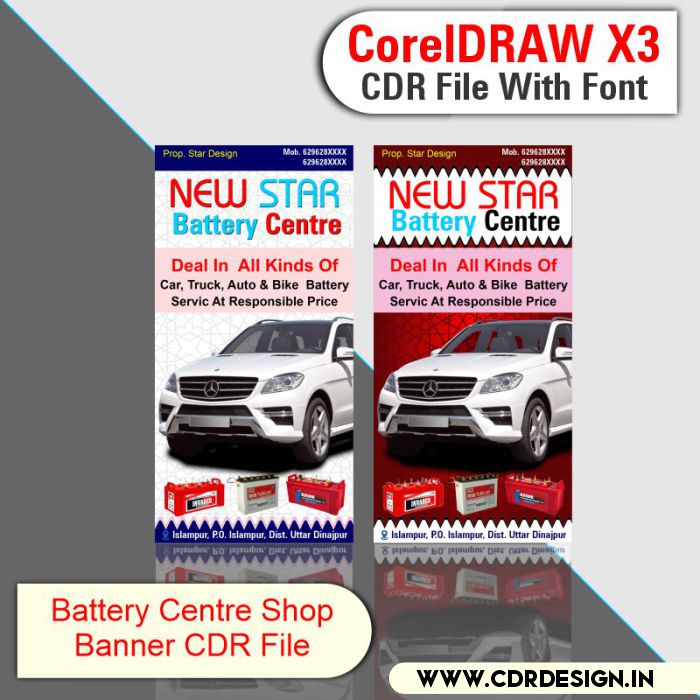

Battery Centre Shop Banner Design CDR File
Original price was: ₹99.00.₹45.00Current price is: ₹45.00.
Battery Centre Shop Banner Design CDR File
CorelDRAW 13Version File
With Font
CDR Version 13 with Font Fully Editable
Color:- CMYK
Siz:- 02MB
ये डिजाईन प्रिंटिंग प्रेस वालों के लिए है अगर आपको एडिट करना आता है तभी खरीदें
-
खरीदने से पहले अच्छे से चेक कर लें कौन सी फाइल है, कौन सा वेर्जन है फॉण्ट दिया गया है की नही
- Note: this design is only for the designers not
- for customers. Customization start from Rs.200
- How to Download:
- https://www.youtube.com/
- Instant Download:
- Your files will be available
- to download once payment is confirmed.
- (instant download items don’t accept returns,
- exchanges, or refunds. Please check all details
- before buying.)
-
- Help Number: call or WhatsApp
- Call us: 6296285862 (9 AM to 6 PM)
- CdrDesign License: Use for personal and
- commercial purposes more info
- Copyright Disclaimer:
- This File is uploaded by
- the user. We do not claim any copyright for
- the content. ( If the contents violate your
- copyright, please email us,
- cdrdesign8@gmail.com
Battery Centre Shop Banner Design CDR File
Thank you for reading this post, don't forget to subscribe!banner design,electronic shop banner design,auto parts banner design,online center banner design,banner kaise banaye,shop banner design,shop banners flex design,banner design photoshop,electronics shop banner design in corel draw,flex banner design,banner design in photoshop,flex banners design in photoshop,#banner design,flex banner design on coreldraw,cyber cafe banner design,new banner design,csc banner design,web banner design
Power Up Your Sales: Designing a Compelling Battery Centre Shop Banner in CorelDRAW
In the competitive automotive and electrical market, a visually striking and informative shop banner is crucial for attracting customers and boosting sales. For battery centres specifically, the banner needs to convey reliability, power, and a clear message about the services offered. Fortunately, software like CorelDRAW empowers you to create professional-looking banners that capture attention and drive business.
This article explores the key considerations in designing an effective battery centre shop banner using CorelDRAW, drawing inspiration from readily available CDR files designed for this purpose.
Why a Good Banner Matters for Your Battery Centre:
- First Impression: Your banner is often the first experience a potential customer has with your business. A professionally designed banner projects credibility and competence.
- Brand Recognition: Consistent branding across your banner reinforces your brand identity and helps customers remember your business.
- Clear Messaging: The banner should clearly communicate what you offer – battery sales, installation, testing, and related services.
- Attracting Foot Traffic: A vibrant and eye-catching banner can entice passersby to stop in and explore your offerings.
Key Elements of an Effective Battery Centre Shop Banner Design:
- High-Impact Visuals:
- Images: Use high-quality images of batteries, car engines, or related electrical components. Ensure the images are clear, modern, and relevant to your target audience. Look for images that convey power, reliability, and durability.
- Color Palette: Choose colors that are energetic and trustworthy. Combinations of blue, yellow, black, and red often work well in the automotive industry. Consider using your brand colors for consistency.
- Graphics: Incorporate graphics such as lightning bolts, power symbols, or stylized illustrations of battery charging to visually communicate the nature of your business.
- Compelling and Concise Text:
- Headline: The headline should be the most prominent text on the banner. Highlight your core offering, such as “Battery Sales & Installation,” “Expert Battery Testing,” or “Get Your Battery Sorted Today!”
- Supporting Text: Provide brief details about your services or special offers. Keep the text concise and easy to read from a distance. Avoid overcrowding the banner with too much information.
- Call to Action: Include a clear call to action, such as “Call Now,” “Visit Us Today,” or “Free Battery Check.”
- Layout and Composition:
- Hierarchy: Arrange the elements on the banner in a logical order, with the most important information being the most prominent.
- Balance: Ensure the banner is visually balanced to prevent it from feeling cluttered or overwhelming.
- Readability: Choose fonts that are easy to read from a distance. Use sufficient contrast between the text and the background for optimal readability.
- Whitespace: Don’t be afraid to use whitespace to create breathing room and improve readability.
Leveraging CorelDRAW for Battery Centre Banner Design:
CorelDRAW provides a powerful and versatile platform for creating professional-looking battery centre shop banners. Here’s how you can utilize its features:
- Vector Graphics: CorelDRAW’s vector-based design allows you to scale your artwork to any size without losing quality. This is crucial for large banners.
- Text Tools: CorelDRAW offers a wide range of text formatting options, allowing you to create visually appealing and legible text.
- Image Editing: While not a dedicated image editor, CorelDRAW offers basic image editing capabilities that can be helpful for adjusting brightness, contrast, and color.
- Templates and CDR Files: Utilize pre-designed battery centre shop banner CDR files as a starting point for your design. These templates often provide a basic layout and design elements that you can customize to your specific needs.
- Visual Effects: CorelDRAW provides various visual effects such as shadows, glows, and bevels, which can add depth and dimension to your banner design.
Working with CDR Files:
Downloading and utilizing battery centre shop banner CDR files can significantly speed up the design process. However, remember to:
- Customize: Don’t just use the template as is. Customize the colors, fonts, images, and text to reflect your brand and specific offerings.
- Check Resolution: Ensure the images used in the CDR file are of high resolution to avoid pixelation when printed on a large banner.
- Verify Licensing: Always verify the licensing terms of any downloaded CDR file to ensure you are using it legally.
Conclusion:
A well-designed battery centre shop banner is a powerful marketing tool that can attract customers and boost sales. By understanding the key design elements and leveraging the capabilities of CorelDRAW, you can create a banner that effectively communicates your brand message and drives business growth. Don’t hesitate to explore available CDR files as a starting point, but always remember to customize them to reflect your unique brand and offerings. Investing in a professional-looking banner is an investment in the success of your battery centre.




Reviews
There are no reviews yet.